Transform your Career with
Power Apps Training in Dilsukhnagar
Join our Online Power Apps Training in Dilsukhnagar at Vinay Tech and learn to build custom business applications without extensive coding. Gain hands-on experience in automating workflows, connecting data sources, and creating user-friendly apps. Turn your ideas into powerful applications that improve and streamline business processes.
Over 300+ reviews

Get a Free Demo
What is Power Apps?
Power Apps is a low-code application development platform from Microsoft that enables users to build custom business applications quickly without extensive programming knowledge. It offers a visual drag-and-drop interface to design apps and easily connect to data sources like Microsoft SharePoint, Microsoft Excel, and Microsoft SQL Server.
With Power Apps, businesses can digitize manual processes, automate workflows, and create responsive applications that work smoothly across mobile devices, tablets, and web browsers. The platform allows both technical and non-technical users to develop scalable solutions that streamline operations and improve overall productivity.
Students can Expect
When you join our Power Apps Training in Dilsukhnagar, you can expect:
All classes are recorded and shared so you can revisit topics anytime.
Why learn PowerApps Now?
In today’s digital workplace, organizations are rapidly adopting low-code platforms to automate processes and improve efficiency. Microsoft Power Apps is at the forefront of this transformation.
High Demand for App Developers:
Businesses need custom applications faster than ever. Power Apps allows you to build powerful business apps with little to no coding.
Boost Career Opportunities:
Learning Power Apps adds a valuable skill to your profile and opens opportunities in roles such as app developer, business analyst, and automation specialist.
Empower Yourself and Your Team:
Create mobile-friendly applications that solve real business problems without depending heavily on IT teams.
Part of the Microsoft Power Platform:
Power Apps integrates seamlessly with tools like Microsoft Power BI, Microsoft Power Automate, Microsoft SharePoint, and Microsoft Teams to build complete business solutions.
Low-Code is the Future:
According to Gartner, nearly 70% of new applications will be developed using low-code or no-code technologies by 2025.
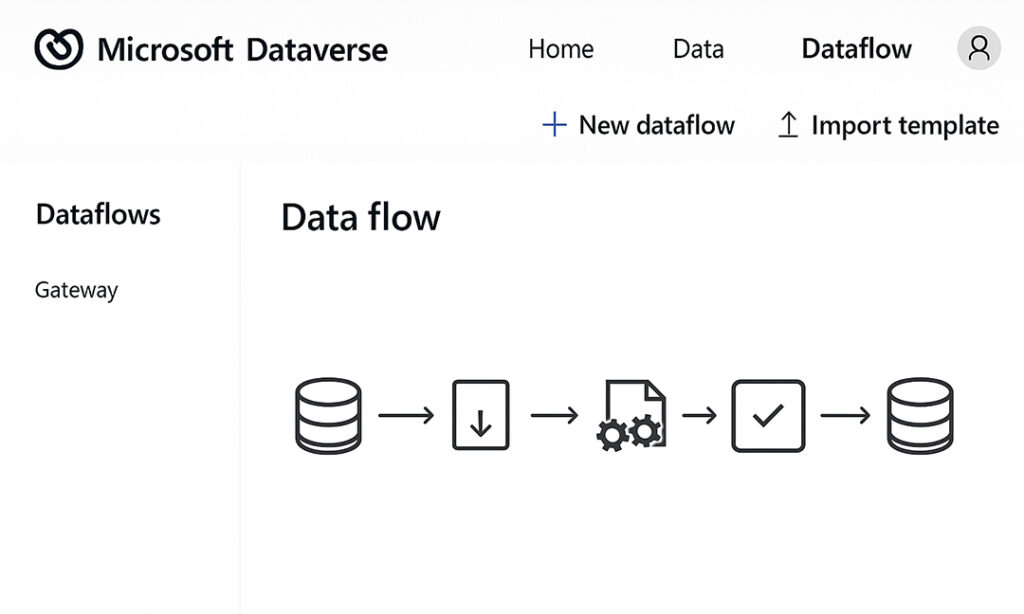
Microsoft Dataverse – Data Flow
Top Menu:
Home | Data | Dataflow
➕ New dataflow | ⬆ Import template
Sidebar:
Dataflows
Gateway
Data Flow Steps:
Source Database →
Ingest Data →
Transform Data →
Validate →
Load to Destination
Career Opportunities After Power Apps
Unlock Diverse Career Opportunities in the Power Platform Ecosystem
Power Platform Developer
Design and build custom business solutions using Microsoft Power Apps, Microsoft Power Automate, and Microsoft Dataverse. These skills are highly in demand across industries for digital transformation projects.
Power Apps Consultant
Work with organizations to design and implement business applications using Power Apps. This role combines technical expertise with business understanding to deliver effective solutions.
Automation Specialist
Automate business workflows and repetitive tasks by integrating Power Apps with Microsoft Power Automate and Microsoft 365 services to improve efficiency and productivity.
Business Analyst
Use Power Apps to create tools that enhance data collection, reporting, and decision-making processes within organizations.
Citizen Developer
Non-technical professionals can build business applications using Microsoft Power Apps without deep coding knowledge, enabling teams to develop solutions tailored to their department’s needs.
Key Benefits at Vinay Tech House
Certified instructors with real-world experience
Hands-on labs & assignments
Doubt-clearing sessions
Resume & interview prep support
Access to recordings and learning materials
Who should learn PowerApps?
Graduates
Gain practical, job-ready skills in low-code app development to boost employability in tech and business roles.
Working Professionals
Boost your skills with Power Apps to automate tasks, streamline workflows, and grow your career in digital transformation.
Career Change
Learning Power Apps lets you switch careers quickly by gaining in-demand tech skills in automation and app development.
Available Modes
For only Recorded Sessions / Corporate Training, Contact us at +91 9859831831
Power Apps Course Features

Expert Trainers
Learn from certified professionals with real-world industry experience.
Comprehensive Curriculum
Covers everything from basics to advanced topics, including app design, data connections, formula writing, and workflow automation.
Hands-On Real-Time Projects
Work on live datasets and industry-relevant projects to gain practical experience.
Placement Assistance
Get help with resume building, interview preparation, and job placement support.
Certification
Receive a recognized Power Apps certification upon successful course completion.
Lifetime Support
Access course materials and get your doubts cleared even after the course ends.
Power APPS Training in Dilsukhnagar
CURRICULUM
- Types of Power Apps
- Power Apps building blocks
- Power Apps Development Environment Setup
- Power Apps for Admins
- Power Apps for Developers
- Create a blank Canvas app
- Create an app from template
- Create an app from a data source (sharepoint)
- Create a Canvas app from excel
- Explanation of Canvas App Layouts
- Create a Blank Canvas App Types of Screens in Canvas App
- Canvas App Screen properties Renaming & Reorder Screen
- Navigate Functions & Its parameters
- Notify Power Apps Functions & Its Parameters
- Introduction to Power Apps Connectors
- Different Types of Connectors in Power Apps
- Build an App using MS Excel as a data source
- Introduction to Gallery, Data table
- Different Between Gallery & Data table
- Different Type of Galleries in Canvas
- Customization of the forms and Gallery controls
- What is Search Function & its parameters
- Implementation of search function
- What is sort Function & its parameters
- If – Else Condition & its Implementation
- Nested if – Else Conditions its Implementation
- Switch Conditions its Implementation
- Use Cases :
a) Modifications to data depending on user input
b) Hide and show controls based on user inputs
- What is Power Apps Variables
- What are Diff types of variables in power Apps
- Scope of Power Apps variables
- Application of Power Apps Variables
- Implementation of Dynamic sort
- Creating Custom form & using patch function for submitting Data
- Using “Updatelf” function to update a record
- Uses of Filter, LookUp & search
- Implementation cascading Dropdown Lists of Dynamic sort
- What is Collection
- How to Create and use collection(s)
- Diff between “collect” & “Clear Collect”
- Overview of Model Driven PowerApps
- What is site map, how to map Dataverse table
- Create views in model driven app
- Create forms in model driven app
- Business roles in model driven app
- Create charts in model driven app
- Create Dashboard in model driven app
- Debug Power Apps with Monitor
- Common Issues & Resolutions
- Get a session or app ID
- Change Power Apps Studio Version
- Troubleshoot startup issues for Power Apps
- Overview of Dataverse
- Different types of Tables in Dataverse
- Create a Table in Dataverse
- Views & Forms in Dataverse
- Define Relationships in Dataverse
- Use Power BI with Dataverse
- Create Power BI Report & Dashboards
- View Table data in Power BI Desktop
- Adding Power BI Reports in Power Apps
- Create Mobile & Tab views for Power BI Reports in Power Apps
- Power Apps usage as a Visual in Power BI
- What is Power Automate & Basic Examples
- Calling Power Apps in Power Automate
Advantages of Learning Power Apps Training in Dilsukhnagar
Versatile App Development Platform:
Power Apps allows users to build custom business applications without writing extensive code, making it ideal for streamlining business operations across industries.
Better Business Process Automation:
It helps professionals and organizations automate routine tasks, improve workflows, and increase efficiency through custom-built apps that integrate with existing systems.
Effortless App Creation:
With its drag-and-drop interface and pre-built templates, Power Apps enables quick development of apps tailored to specific business needs—no deep coding expertise required.
Powerful & Interactive User Experience:
Power Apps allows you to create visually appealing, responsive apps that work seamlessly on web and mobile, delivering a consistent and engaging user experience.
Enterprise-Grade Platform:
Backed by Microsoft, Power Apps ensures top-tier security, compliance, and scalability, with deep integration into the Microsoft ecosystem including Office 365, SharePoint, and Azure.
User-Friendly Interface:
The intuitive visual designer makes app development accessible to both non-developers and IT professionals, reducing reliance on traditional development cycles.
Multi-Purpose Utility:
From HR onboarding tools to sales dashboards and inventory tracking, Power Apps can be customized to suit the unique needs of different departments and industries.
Seamless Data Integration:
Power Apps connects easily with hundreds of data sources including Microsoft Dataverse, SQL Server, Excel, Dynamics 365, SharePoint, and various third-party APIs.
Superior to Traditional App Development:
Compared to traditional development frameworks, Power Apps drastically reduces time-to-market and development costs, making digital transformation faster and more accessible.
Daily Workflow Enhancement:
Its powerful automation features help businesses save time, reduce errors, and make smarter decisions—ultimately improving productivity and user satisfaction.
Why Choose Power Apps Training in Dilsukhnagar with Vinay Tech House?
A complete learning solution that offers real-time, hands-on training across every module of Power Apps—designed to make you job-ready in low-code/no-code app development.
We provide industry-relevant case studies to help reinforce concepts with practical, real-world Power Apps scenarios.
Sessions are customized to your schedule and delivered by expert trainers with real-time experience in Microsoft Power Platform and enterprise app development.
All classes are recorded and shared for future reference, allowing you to revise and practice at your own pace.
We offer flexible batches including weekday, weekend, and fast-track options, available in both online and classroom formats.
Our affordable and flexible payment plans are designed to suit working professionals, students, and corporate learners.
Frequently Asked Questions
Imagine creating user-friendly business apps without writing a single line of code! That’s the magic of Microsoft Power Apps. It’s a cloud-based service that lets anyone, from tech beginners to citizen developers, build custom apps that solve specific business needs.
We’ve got you covered. We record Daily Live Classes and share the records everyday. You can watch at your own time, practice and ask the trainer any queries you have
Here are the key features that make Power Apps a powerful tool for building custom business applications: Drag-and-Drop Simplicity, Customizable Solutions, Rich User Interface Elements, Power Automate Integration, Cloud-Based and Scalable.
Vinay Tech offers a comprehensive Power Apps course designed so you can add Power Apps to your skillset . Our training program equip you with the knowledge and skills to build impactful business apps that drive success.
The main purpose of Power Apps is to empower anyone to build custom business applications without the need for extensive coding . It’s a Microsoft cloud-based service designed for both technical and non-technical users.
PowerApps helps everyone who works with data (Excel, databases, files, cloud sources etc.) automate tasks. No coding needed. BI Analysts, admins, and even developers use it for their workflow.
Data Analysts, Data Engineers, Data Quality Specialists, Data Scientists, Data Stewards, Technical and Functional Managers, and Customers interested in generating their own customised apps.
Get certified by VinayTech
Get certified by Vinay Tech and boost your career with industry-recognized certifications. Our expert-led training across various courses ensures you gain practical skills that employers value. Complete your course and earn a certificate that showcases your expertise and commitment to professional growth.
Our Learners Work At