Transform your Career with
Microsoft Fabric Training in Hyderabad
Over 300+ reviews

Get a Free Demo
What is Microsoft Fabric?
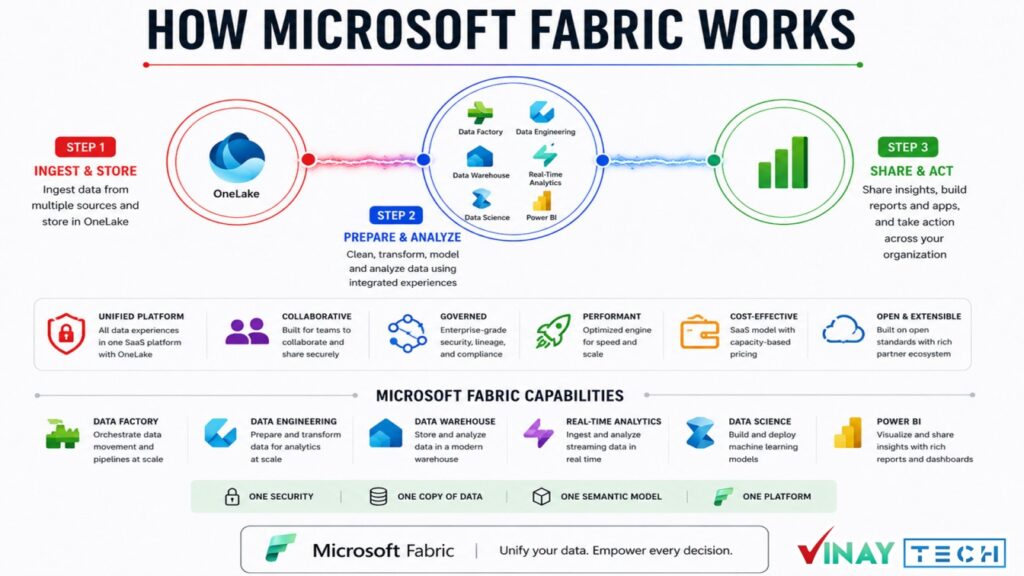
Microsoft Fabric is a unified analytics platform from Microsoft. It brings data integration, engineering, warehousing, analytics, and business intelligence together.
It includes capabilities such as OneLake, Data Factory, Data Engineering, Data Warehouse, Power BI, and Real-Time Intelligence.
Fabric helps organizations manage data workflows and create insights from different data sources.
Students can Expect
When you join our Microsoft fabric Training in Hyderabad, you can expect:
What Will You Learn in Microsoft Fabric?
By enrolling in Microsoft Fabric training in Hyderabad at Vinay Tech House, you will gain practical skills to build modern data analytics solutions using Microsoft Fabric.
Microsoft Fabric brings multiple data and analytics workloads into one integrated platform.
Learn skills related to data engineering, business intelligence, data analytics, cloud data, and real-time analytics.
With practical projects, you can understand how data moves from ingestion and transformation to reporting and business insights.
Microsoft Fabric Overview – Learn architecture and core features.
Power BI Integration – Create dashboards and visual reports.
Data Factory – Build ETL/ELT pipelines and automate workflows.
Synapse Engineering – Perform analytics using Spark and SQL.
OneLake & Lakehouse – Manage unified data storage solutions.
Notebooks & Spark – Explore and transform data efficiently.
Data Activator – Configure real-time alerts and automation.
Security & Governance – Apply compliance and access controls.
Real-Time Projects – Gain hands-on experie
Why Learn Microsoft Fabric?
Microsoft Fabric helps professionals build skills in data analytics, BI, and cloud technologies using a unified Microsoft platform. It simplifies data integration, reporting, and real-time analytics while creating strong career opportunities for data analysts, BI developers, and data engineers.
Microsoft Fabric is a unified Microsoft platform for analytics, business intelligence, and data engineering, creating strong career opportunities for skilled professionals worldwide.
Top Career Opportunities:
Data Analyst
BI Developer
Data Engineer
Analytics Engineer
Data Scientist
Fabric Administrator
Unified Platform – Combines the power of:
Power BI
Data Factory
Azure Synapse
Data Activator
OneLake
Notebooks & Spark
End-to-End Workflow
AI Integration
Security & Governance
Graduates
Working Professionals
Data professionals
Available Modes
For only Recorded Sessions / Corporate Training, Contact us at +91 9859831831
Microsoft Fabric Course Features
Learn Microsoft Fabric in Hyderabad – From Basics to Advanced

Expert Trainers
Comprehensive Curriculum
Hands-On Real-Time Projects
Placement Assistance
Certification
Lifetime Support
CURRICULUM
Introduction to Azure Data Engineering, Data Analyst & Data Scientist.
Introduction to Azure Cloud (Resources | Services) & Type of Clouds.
Introduction to Microsoft Fabric
Introduction to Microsoft Azure
Introduction to Microsoft Power BI
Overview of Microsoft Fabric
Key Features and Capabilities
Use Cases and Benefits
MS Fabric Account Creation
Fabric Capacity (SKU)
Comparison with Other Data Engineering Services
Overview of the Major Roles Performed by a Microsoft Fabric Developer
Responsibilities in Data Engineering, Data Integration, Data Warehousing,
Real-Time Analytics, Data Science, & Business Intelligence
Introduction to the various tools and services available in Microsoft Fabric
Data Lakehouse
Data Lake & Delta Lake
Data Warehouse
One Lake Storage
(One Lake Explore & Data Studio)
Shortcuts
SQL End Points
Data Factory Pipelines & Activities
Data Flow Gen1
Data Flow Gen2
Notebooks
Apache Spark
Spark Job Definitions
Real-Time Analytics
Power BI
Data Activator
Data Gateway
Data Science
How to create a subscription to Microsoft Fabric
Exploring subscription options and settings in Microsoft Fabric
How to create and manage workspaces in Microsoft Fabric
Workspace configurations and settings
Lakehouse: – Introduction to the Lakehouse concept Creating a Lakehouse in Microsoft Fabric Data Lakehouse vs Data Warehouse Exploring options and features in Lakehouse Work with Delta Lake tables in Microsoft Fabric Uploading files to the Lakehouse using (Browser & One Lake)
Loading Data Using Data Factory Pipelines | Data Flow | Notebooks
Overview of SQL End Points
Connecting to SQL End Points
Writing Data on Tables in Lakehouse using SQL End Points
Creating Visual Queries using SQL End Points
Creating Modeling using SQL End Points
Creating New Measures
Creating New Reports Using Power BI
SQL Commands, Views, SP, Joins, Functions
Creating Azure Subscriptions (Free, Student & Pay As You Go)
Creating Resource Groups
Creating Resource | Services
Azure Storage Accounts (Blob, File Share, Table & Ques)
Azure Data Lake Store (Data Lake Gen1 & Data Lake Gen2)
Azure Data Lake Analytics
Azure SQL DB (Azure SQL SERVER)
Azure Data Factory – Pipelines, Various Activities, Type of Data Set, Data Flow,
Power Query, Type of Integration Runtime, Linked Services & Triggers
Azure Synapse DWH & Analytics
Exploring Data Factory Activities
Designing Pipelines to copy data from Blob Storage to Lakehouse
Designing Pipelines to copy data from On-Premises SQL to Lakehouse
Designing Pipelines to copy data from Data Lake Gen2 to the Lakehouse
Designing Pipelines to copy data from HTTPS websites to the Lakehouse
Designing Pipelines to copy data from Lakehouse to Data Warehouse
Designing Data Flows Gen2 to copy data from the Lakehouse to the
Data Warehouse applying transformations
Scheduling and monitoring of pipelines
Introduction to Data Warehouse
Dimensions and Fact Tables in Data Warehousing
Star and Snowflake Schema Concepts
Differentiating Dimension & Fact Tables
Slowly Changing Dimensions
Creating a Data Warehouse in Microsoft Fabric
Creating Tables & Relationships in the Data Warehouse
Creating visual queries in the Data Warehouse
Loading Data Using Data Factory Pipelines | Data Flow | Notebooks: –
Copying Data from Blob Storage into the Data Warehouse using Copy Activity.
Cross-Querying Data from the Lakehouse into the Data Warehouse
Creating Staging Tables in the Data Warehouse
Loading & Transforming Data from Lakehouse to Data Warehouse Tables using Data Flow
Gen2
Loading and Transforming Data from Lakehouse to Data Warehouse Tables using Data
Factory Pipelines
Loading & Transforming Data from Lakehouse to Data Warehouse Tables using
Notebooks
Creating reports using Power BI from the Data Warehouse
Understanding Shortcuts in Lakehouse
How to Create Shortcuts
Querying data using Shortcuts in the Lakehouse from Various Sources System
Configuring Spark in a Microsoft Fabric workspace
Writing Py Spark and Spark SQL Notebooks
Creating Delta Lake Tables in the Lakehouse using Notebooks
Using Spark Data Frames to analyze and transform data
Using Spark SQL to query data in tables and views
Visualizing data in a Spark notebook
Running Spark code using Spark Job Definitions
Introduction to Power BI
Power BI Desktop
Power BI Online Services
Power BI Mobile App
Creating Columns & Measures Using DAX
Connecting to Different Data sources
Design reports and Dashboards
Implementing Bookmarks
Publishing Power BI report
Row-Level Security
Gateways in Power BI
Data Refresh Schedules in Power BI
Design reports and Dashboards
Creating the Free Microsoft Fabric & Azure account.
Create the workspace in Fabric and Build a Lakehouse in fabric.
Install One Lake Explorer & Data Studio
Create Your First warehouse in Fabric | | Lakehouse vs Warehouse
Microsoft Fabric: Introduction to Data Factory Experience | Pipelines & Dataflows
End-to-End Scenario with Data Factory Pipelines and Dataflows Gen2
End-to-End Mini Project: Data Factory Pipelines and Dataflows Gen2
Apache spark in Fabric & Notebook creation
Work with Delta Lake tables in Microsoft Fabric
Data Factory Pipeline, Activities, Data Set & Linked Service
Copy data from REST API to Lakehouse in Fabric using Bearer Token
Moving Multiple Folders from Data Lake Storage Gen2 to Lakehouse
Ingest Data from On Premise SQL Server to Lakehouse| Data Gateway
Microsoft Fabric: Copy data from Azure SQL DB to Lakehouse Table | Query | Stored proc
Microsoft Fabric: Copy Multiple tables from Azure SQL DB to Lakehouse dynamically
Ingest data from on premise SQL server to Warehouse Incrementally
Microsoft Fabric: Logging Fabric Pipeline Logs to Warehouse table using stored proc
Microsoft Fabric: Incremental data ingestion from Azure SQL DB to Warehouse in Fabric
Azure Synapse and its Usage
How to copy data from one blob to another blob using synapse pipelines
How to copy multiple latest files from blob to blob and how to copy file with
appended timestamp
Semantic model creation in fabric (Star & Snowflake) Schema
Creation of Microsoft Power BI reports
Connecting Power BI with Multiple sources & developing different format report.
Microsoft Fabric Training in Hyderabad
Learn modern data analytics and data engineering with Microsoft Fabric Training in Hyderabad. Gain practical knowledge of Microsoft’s unified analytics platform, combining data integration, data engineering, data science, and business intelligence.
Explore essential Microsoft Fabric components, including OneLake, Data Factory, Lakehouse, Data Warehouse, Notebooks, Data Pipelines, and Power BI.
Learn to build data pipelines, integrate multiple data sources, process data using Apache Spark and Delta Lake, and develop scalable analytics solutions.
Understand Real-Time Intelligence, KQL, AI, and Copilot capabilities to work with modern data analytics workflows.
Our Microsoft Fabric Course in Hyderabad focuses on hands-on exercises and real-time projects covering data ingestion, transformation, warehousing, semantic models, and Power BI dashboards.
Develop practical skills in Microsoft Fabric, Data Engineering, Data Analytics, and Business Intelligence.
A comprehensive training resource that includes real-time, hands-on scenarios for every module using Microsoft Fabric solutions.
We provide industry-based case studies to support practical learning in Microsoft Fabric.
Our sessions are conducted by highly skilled professionals with real-time project experience, customized to fit your learning preferences.
All sessions are recorded and shared for future reference and revision.
We offer weekday, weekend, and fast-track batches to make learning flexible and accessible, both online and offline.
Our affordable and flexible payment plans are designed to support working professionals, students, and corporate teams alike.
Microsoft Fabric Training in Hyderabad
Learn Microsoft Fabric with AI
Microsoft Fabric Course in Hyderabad
Learn Microsoft Fabric with Real-Time Projects
Learn Microsoft Fabric with Real-Time Projects
Frequently Asked Questions
Microsoft Fabric Training in Hyderabad
Microsoft Fabric is a unified analytics platform used for data integration, processing, visualization, and real-time insights across business intelligence solutions.
Yes! We provide resume building, mock interviews, and job referrals to help you secure a role in the data industry.
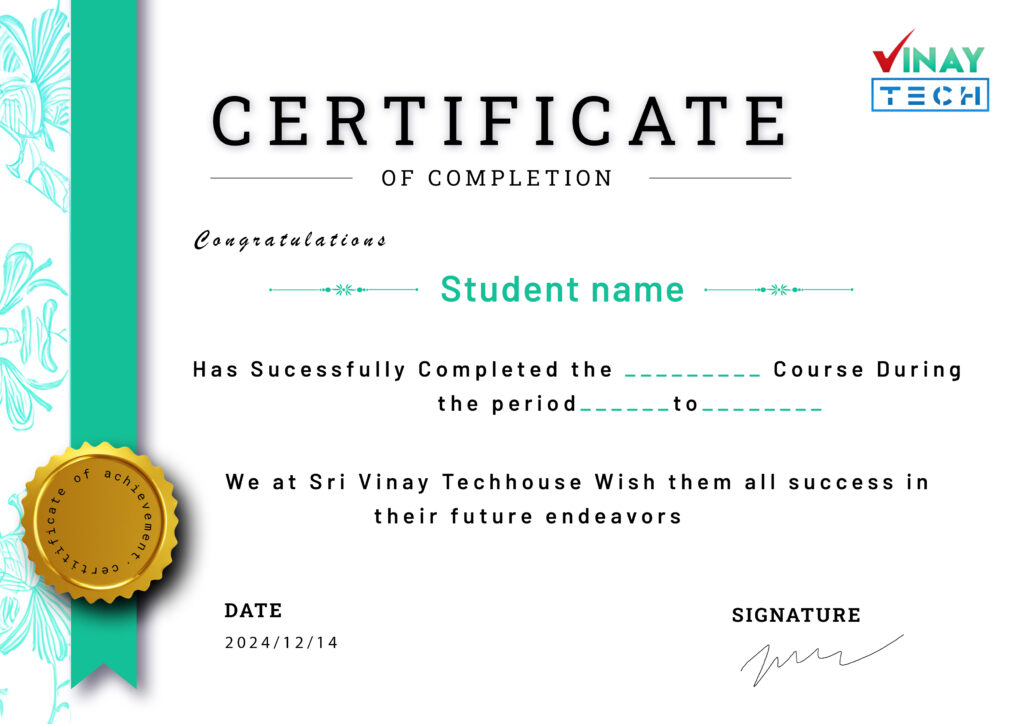
Get certified by VinayTech
Upon successful completion of the course, you will receive a Vinay Tech Course Completion Certificate. This certification enhances your resume and can significantly boost your chances of securing top job roles in leading multinational companies (MNCs). The certificate is available both as a digital copy and a printable hard copy, providing flexibility based on your needs.
Our Learners Work At