
Power BI Training in Chennai
Over 300+ reviews

Get a Free Demo
What is Power BI?
Power BI is a leading business intelligence (BI) and data visualization tool developed by Microsoft. Designed for both technical and non-technical users, Power BI allows you to connect to multiple data sources, clean and transform data, and create interactive reports and dashboards—all without needing deep coding skills.
With Power BI, businesses can turn raw data from sources like Excel, SQL databases, SharePoint, cloud services, and more into clear, actionable insights. Whether you’re analyzing sales performance, customer trends, or operational metrics, Power BI helps you make data-driven decisions faster and with more confidence.
You can also explore Microsoft Power BI documentation and tutorials to deepen your understanding and unlock the full potential of this powerful BI platform.
Students can Expect
When you join our Power BI Training in Chennai, you can expect:
Revisit sessions anytime access to recorded classes (1.5 years)
Why learn Power BI?
Microsoft Power BI Overview
Microsoft Power BI is one of the most in-demand Business Intelligence (BI) tools used by leading organizations worldwide. It helps professionals transform raw data into meaningful insights through interactive dashboards and visually appealing reports. With its intuitive interface and powerful analytics capabilities, Power BI enables smarter, data-driven decision-making across all industries.
Key Features of Power BI
✔ User-Friendly Interface
Power BI offers a clean, drag-and-drop workspace, making it easy for beginners to create dashboards without any prior coding knowledge.
✔ Connects to Multiple Data Sources
Seamlessly integrate data from various sources such as Excel, SQL Server, Web APIs, Azure, cloud databases, and hundreds of other connectors.
✔ Advanced Data Modeling & DAX
Build relationships between tables, write complex calculations using DAX (Data Analysis Expressions), and analyze business performance with precision.
✔ Interactive Dashboards & Visualizations
Create dynamic dashboards with charts, maps, KPIs, tables, and custom visuals to present insights in an engaging and meaningful way.
✔ Real-Time Reporting
Monitor live business metrics anytime from anywhere with Power BI’s real-time dashboards and cloud-based sharing options.
✔ High Industry Demand
Power BI is widely used across sectors like Finance, Healthcare, Retail, E-commerce, Manufacturing, and Information Technology, offering excellent career growth for data professionals.
Visualize. Analyze. Succeed.
What You’ll Experience in Our Power BI Training
🔹 Real-World Simulated Environment
Work with the same types of datasets used by industry analysts, BI developers, and data professionals to solve real business problems.
🔹 Rich, Interactive Visuals
Create professional visualizations such as pie charts, bar graphs, KPIs, cards, slicers, maps, trend lines, and custom visuals to present data with clarity and impact.
🔹 Complete Power BI Skillset
Master all core components of Power BI, including:
Power Query
DAX (Data Analysis Expressions)
Data Modeling
Power Pivot
Power View
🔹 Data Connectivity & Preparation
Learn to connect Power BI with Excel, SQL Server, Azure services, Web APIs, and cloud databases.
Develop strong skills in cleaning, transforming, and shaping raw data into analysis-ready formats.
🔹 Dashboard & Report Building
Design high-quality, business-ready dashboards used for strategy, operations, forecasting, performance tracking, and executive reporting.
🔹 Mentorship From Industry Experts
Receive personalized guidance, project support, interview preparation, and placement-oriented assistance from experienced Power BI professionals.
🔹 Live Projects & Real-Time Datasets
Work on real business scenarios to build confidence and become job-ready with practical, hands-on experience.

Career Opportunities After Completing Power BI Training
Learning Power BI opens the door to multiple high-growth career paths in data and analytics. Here are some of the top roles you can pursue:
1. Data Analyst
Interpret data, identify trends, and help organizations make informed, strategic decisions.
2. Business Intelligence (BI) Analyst
Design dashboards, reports, and analytics solutions that uncover key business insights.
3. Data Visualization Specialist
Transform complex datasets into meaningful visual stories using charts, graphs, and interactive dashboards.
4. Power BI Developer
Develop, maintain, and optimize Power BI reports, dashboards, data models, and enterprise BI solutions.
5. BI Consultant
Guide organizations in choosing the right BI tools, building reporting systems, and improving data-driven decision-making.
6. Reporting & Insights Analyst
Deliver real-time, dynamic reports that help leadership teams monitor performance and take quick action.
7. Analytics Executive
Track business metrics, analyze KPIs, and provide insights to improve operational efficiency and business outcomes.
8. Self-Service BI Specialist
Enable business teams to explore data independently by building reusable datasets, reports, and intuitive dashboards.
Graduates
Kickstart your career in data analytics with essential Power BI skills.
Working Professionals
Upgrade your profile with in-demand business intelligence and visualization tools.
Career Change
Make data-driven decisions by creating insightful reports and dashboards.
Who Uses Power BI?
- Business Analysts
- Data Analysts
- Managers & Executives
- Finance & Sales Teams
- Students & Freshers entering the BI field
Power BI Components
- Power BI Desktop
- Power BI Service (Online)
- Power BI Mobile App
- Power BI Gateway
- Power BI Report Builder
Power BI Is Used For
- Business performance tracking
- Sales and marketing analysis
- Financial reporting
- Operations and inventory monitoring
- Customer and employee insights
Available Modes
For only Recorded Sessions / Corporate Training, Contact us at +91 9859831831
Power BI Course Features

Expert Trainers
Learn from certified professionals with real-world industry experience.
Comprehensive Curriculum
Covers everything from Power BI basics to advanced topics like DAX, Power Query, and data modeling.
Hands-On Real-Time Projects
Work on live datasets and industry-relevant projects to gain practical experience.
Placement Assistance
Get help with resume building, interview preparation, and job placement support.
Certification
Receive a recognized Power BI certification upon successful course completion.
Lifetime Support
Access course materials and get your doubts cleared even after the course ends.
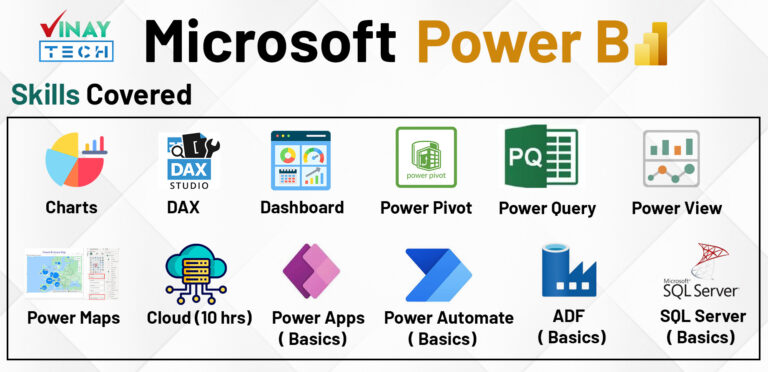
Power BI Training in Chennai
CURRICULUM
MANDATORY Topic 1: POWER BI DEMO AND DATA WAREHOUSE FUNDAMENTALS
Data, Data Availability types in IT
IT data storage areas [File stream, Database]
Data warehouse, BI definitions and layers
Power BI existence in IT, Product services
Power BI Features, Self Service BI
Power BI Tools and Components
On-Premises vs. Cloud
Power BI Opportunities vs Support
BI history, MSBI, Azure BI, Power BI
OLAP vs. OLTP vs. Insights and Analytics
Power BI history, releases and blogs
Power BI usage in IT Companies
Microsoft Power Platform & Fabric Features
Data warehouse, Data Mart and differences
Types of data marts and real-time usage
ODS, Stage, EDW, and DW definitions
Data Lake and Blob Storages
DWH Life Cycles, DWH principles
DWH Approaches (INMON and KIMBALL)
Data Granularity, Data movement stages
MANDATORY Topic 2: DATA MODEL THEORY AND PRACTICAL
Data model, use of data model in Power BI
Business, Conceptual, Logical, Physical models
Dimension, Dimension table & types
( Conformed, RolePlay, Degenerated, Junk, SCD)
Measures & Types
(fully additive, semi additive, non additive)
Fact table & Types
(Snapshot, Incremental, Factless fact)
Schemas (star, Snow Flake, Galaxy & Hybrid)
Surrogate key and usages in real time
1:1, 1: Many, Many: Many relationships
Active, Inactive relationships
Single and Bi-directional, Cross filter
Advanced properties of fields
(sort order, date category, aggregators)
Snow Flake schema exmaples
TOPIC 1: INSTALLATION [Power BI DESKTOPS, GATEWAY, SERVER, REPORT BUILDER & DAX STUDIO]
Power BI Components
Release impact on installation
Power BI Cloud Desktop installation
Power BI Report Server Desktop installation
DAX Studio installation
Report Server installation
Paginated Report Builder Installation
Gateway Installation
TOPIC 2: WORKNG WITH POWER BI DESKTOP AND CONNECTING TO MANY DATA SOURCES
Desktop over view and Building blocks of PBI Desktop
Connecting to various sources and retrieving data
1. Flat files
2. CSV files
3.JSON files
4. Databases (SQL Server & Oracle)
5. Excel files
6. Web
7. Analysis Services Models [Tabular & Multi-dimensional model]
8. Azure SQL database and DWH
9. Python Script
10. M- Retrieval
11. Multiple files load at a time
TOPIC3: WORKING DATABASES, CUBES, MODES & CHANGING MODES
Working on data modes [very detailed] Import
Import
Direct Query
Connect Live
Mixed mode
Changing modes
Differences between Load and Edit options.
Retrive date from related data bases and cube
TOPIC4: WORKNG ON POWER BI MODES [ IMPORT, DIRECT QUERY, AND CONNECT LIVE]
Power view
Power query
Power map
Power pivot
TOPIC 5: POWER BI VIEW MENU TAB OPTIONS-RIBBON OPTIONS & REAL-TIME
New, open, save report
Export Power BI template (PBIT), PDF
Import Power BI Template, Power Query, View, Model, Visual files
Options and Settings & About
External Data: Get Data, Recent Sources, Enter Data
Transform data & edit parameters
Publishing to cloud service
Prop data AI (2025)
Quick sources
sensitivity
Report Phone Layout / Desktop View Show Gridlines, Snap Objects to Grid Locking Objects on the surface
Bookmarks creation, viewing, & using in Dashboard Selection Pane [Hiding and showing objects]
Slicer and Sync Slicers explanation with practical Performance analyzer test run
Scale to fit: Page view, Mobile: Mobile layout, page options
Show panes: Filters, Bookmarks, selection, Performance Analyzer, Sync slicers
Relationships: manage Relationships
Create roles and implement row-level security & dynamic row-level security
Page Refresh: Change detection
Parameters: New parameters
security: Manage roles, View as
Calculations: New measure, Quick measure, New column, New table
Q&A: Language, Lunguistic schema
Guided learning, documentation, training videos, blogs, communities, Power BI for developers, Support and Consulting Services
Edit interactions for the visual for cross highlighting, cross filtering, and none options.
Bring forward, send backward etc…visual option (Z-Order)
Drill down report creation
Drill one level down, multiple levels, and data drill
Visual table, Data point table
Visuals: New Page, New Visual, More Visuals
AI Visuals: Key influencers, Decomposition Tree, Smart Narrative, Q & A
Elements: Text box, Buttons, Shapes, Image
Power Platform: Paginated Report, Power Apps, Power Automate
Sparklines: Add a Sparkline
DAX studio
Refresh, Pause, Preset, Optimization
TOPIC 6: POWER BI DATASET PROPERTIES
Create hierarchies and analyzing data.
Create Groups (List, Bin)
Hide / Unhide columns usage in real-time
Consider table as Date Table
Expand and collapse columns
Incremental refresh & manage aggregations
TOPIC 7: POWER QUERY PROPERTIES [ 8 types of properties and M-Language]
Real-time practical on duplicates and references
Create groups to classify tables
Refreshing table data and enabling data to tables
Creating reusable functions
Perform data transformations by adding, removing and retaining columns, duplicates, errors.
Working on reusable functions
Merging multiple queries
Joining multiple queries to get matched, unmatched and both matched and unmatched rows.
Data types, Different types of data transformations on
a) Numeric columns
b) String columns (split strings)
c)Date columns
Full real-time examples on the data transformations
Working on Number, String, and Date
Various filter options
Working on Any, List, and Query Parameters
Working on multiple parameters
Working on cascading parameters
Working on cascading parameters
Transpose rows, reverse rows, pivot & unpivot
View options [monospaced font, column profiling, column distribution, performance monitoring]
Syntax, protocols, variables and conventions
Let, In, semicolon, and other functions
TOPIC 8: POWER BI VIEWS , FILTERS, VISUALS AND VISUAL FORMATING OPTIONS
Report View
Data View
Relationship View
DAX Query view (2024)
Visualization level
Page level
Report level
Drill though page level
Drill through cross report level
Card, Multi-row, Table, Matrix, New-card (2024)
Charts
Rounded charts: Pie, donut
Bar: Stacked, Clustered, 100% stacked
Trend: Line, Area, Stacked Area, Ribbon, Mixed Charts, Rectangle Tree Map, Funnel, scatter, Waterfall
Maps (Bubble, Filled, Shape, ARCGis, Azure map 2024)
AI Visuals: Key-influencer, De-composition, Smart Narrative, QA
Others: Sparklines, metric, Paginated Report, R, Python
Bullet Chart
Chiclet Slicer
Hierarchy Slicer
Gantt Chart
Histogram Chart
Dual KPI
Scroller
Image
Textbox
shapes
Button actions
Actions: Bookmark, page navigation, back, QA, URL, apply slicers & clear slicers
Dual KPI
Scroller
Slicers: types, usages, sync slicer
Filers & types
Edit Interactions
Parameters & What-if parameters
TOPIC 9: POWER BI CLOUD SERVICE (app.powerbi.com)
Navigation pane
Portal URL explanation
App Launcher
settings
Help & Support
Feedback
Account information
Add dashboards, reports, and work books
My workspace and properties
User app workspaces and properties
Workspace Settings and Roles
workspace Access
Create dash board
Add the below tiles
a) Image tile
b) Text box tile
c) Video tile
d) Streaming tile
e) Live page tile
f) Visual tile
g) Book mark tile
h) Workbook tile
i) Insight tile
j) Usage Metrics tile
Share and Subscribe dash board
Refresh Dashboard
Manage Alerts
Tile & dashboard properties
Real-Time dashboards practice with more DAX
Create, modify, and delete appspace
Add content (show or hide)
Audience (organization or users)
Additional Settings (copy, build)
Publish and Update app
Browse App in Web, Desktop and Mobile
END USER EXPERIECE PROVIDED
Settings (Admin Operations)
- Manage gateways & sources
- Admin portal
- item setting, Language setting, QA
- Manage group storage
- Manage Personal Storage
Refresh (on-demand and scheduled)
Security ( Row Level Security)
Download, Generate reports, Paginated reports
Dataset Setting (Gateway and others)
Parameters & Data Source Credentials
Data Connections
Cache Setting > QA setting > manage permissions
Download and Install Power BI Gateways
Install & Configure Gateways
Add Data Sources
Desktop, Service, and Mobile App
Refresh (on-demand, scheduled and automated)
Gateway trouble shooting
Refresh Flat Files & data bases
Deployment and Deployment pipelines
New and updates entities deploy
Setting, Access, History of pipelines
Edit Report, Mobile and Web View
Quick Insights and usage Metrics
Persistent Filters and Cross Report
Share, Subscribe, and Refresh
Lineage view, View Related
Comments and Chatin Teams
Manage permissions
Scorecard and Metrics or Goals Refresh Metrics
Create and modify dataflow
Power Query Operations
Common Data Model [CDM] usage
Save and use Dataflow
Refresh (On-demand, scheduled, Incremental Refresh)
TOPIC 10: DAX [DATA ANALYSIS EXPRESSIONS] DAX Expression, Query Language & DAX Studio (10 hrs)
Syntax and usage
Naming conventions, parameters
Operators, functions (15 categories)
Context transition (row, column, filter, multi-row)
DAX Queries, DAX Studio and SSMS
DAX FAQS, Optimization & Standards
Good material provided for all the functions
a) Date b) Filter c) Math & Trig d) Statistical e) Table Manipulated f) Informational g) Relationship h) Logical i) Parent Child j) Time Intelligence k) INFO Function l) Windows Functions (2022 Dec) m) NEW Functions (2024)
Statements: Evaluate, Define, Var, Order By
Calendar, Calendarauto, Day, Month, Year YearFrac, Date, Time, DateValue, TimeValue, Edate, EOMonth, Weekday, WeekOfMonth Today, UTCToday, Now, UTCNow, DateDiff
And, Or, Not, Iferror, If, Switch, In, True , False, Coalesce
Path, Pathlength, Pathcontains, Pathreverse, PathItem
Addmissingitems, Filter, Filters,Distinct, Values, Countrows, All, Allexcept, Earlier, Earliest, KeepFilters, Remove filters, Calculate, Calculatetable, AllSelected, AllNoBlankRow
Related, Relatedtable, UseRelationship, Crossfilter, ContainsStringExact
ContainsRow, Contains, ContainsString, Iseven, Isodd, Istext, UserName, UserPricipalName, LookUpValue, IsError, IsNonText, IsNumber, IsLogical, Isinscope, Isonorafter,Hasonefilter, IsCrossFiltered
Sum, Sumx, Average, AverageX, AverageA, Max,MaxX,MaxA, Min, Minx,MinA,Count, CountX, CountA, CountBlank, DistantCount, DistantCountNoBlank, Product, ProductX, Courtrows, Approximate, Distinctcount
Permut, Rank.eq, Rankx, Sampl, Statistical data, Operation functions
AddColumns, AddMissingItems, CrossJoin, CurrentGroup, DataTable, DetailRows, DistinctColumn, DistinctTable, Except,Filters, Generate, GenerateSeries, Groupby, DataTable, Except, Intersect, Union, Symmarize, Summarizecolumn, GenerateSeries, NaturalInnerJoin, NaturalLeftOuterJoin, Crossjoin, Treatas, Isempty, Row SelectColumns, Values,
Blank, Code,Unichar,Concatenate, Combinevalues, Cacatinatex, Trim, Rept, Replace, Substitute, Find, Search, Format, Mid, Left, Right, Value, Upper, Lower
TOPIC 11: ADDITIONAL SESSIONS [MICROSOFT FABRIC UNDERSTANDING, AZURE SESSIONS]
Azure cloud and introduction
Azure portal, resources, and resource groups
Azure account creation and pay-as-you-go
Azure Sql Database, Data warehouse, and Analysis Services Databases
Aure Blob and Data Lake Storages Introduction
Azure Data Factory [ADF] Introduction
ADF- Pipelines, Sources, Sync, and Azure Log Analytics Workspace
Azure Active Directory [AAD]
TOPIC 12: POWER AUTOMATE, POWER APP & POWER BI EMBEDDING
Microsoft Power Automate [Microsoft flow]
Power Automate overview
Flow.microsoft.co understanding with accounts and components
Scheduling the Dataset refresh
Implement set of operations using flow EMAIL, Dataset Refresh, Power Apps
Power Apps Overview
make.powerapps.com understanding
Understanding different apps
[Canvas, Model Driven, Portal from Blank]
Power Apps few scenarios practice
APP showing Power Bi Report [Embedding] APP to connect to report and edit details. Create and manage a data form OneDrive
Basic Material and Live Class Videos Shared
Frequently Asked Questions
Power BI Training in Chennai
“Powering BI”, added more features to the existing BI. It is a Self Sevice Business Intelligence (SSBI) Software Service which generates Reports and Dashboards for better Decision Making and quick Insights
It is easy to learn since it is a Low-Code application ( full support to graphical)
We’ve got you covered. We record Daily Live Classes and share the records everyday. You can watch at your own time, practice and ask the trainer any queries you have
Yes, Microsoft is the leader in Analytics and Business Intelligence since 16 years. It is providing its wonderful support to the current cutting edge processes and technologies by its monthly updates. And also On-Premise MSBI and Cloud Azure BI providing other BI supportive services beside Power BI. Kindly visit the following links to know more about the Power BI Market & Leadership
– https://powerbi.microsoft.com/en-us/blog/microsoft-named-a-leader-in-the-2022-gartner-magic-quadrant-for-analytics-and-bi-platforms/
– https://powerbi.microsoft.com/en-my/blog/microsoft-named-a-leader-in-the-forrester-wave-augmented-bi-platforms-q3-2021/
Key features of Power BI include intuitive data visualization tools, seamless data integration from various sources, robust analytics capabilities, interactive dashboards, real-time data updates, natural language querying, collaboration tools, and enterprise-grade security and compliance measures.
Individuals and professionals across various industries, including data analysts, business intelligence professionals, financial analysts, marketers, operations managers, and decision-makers, can benefit from Power BI training. Additionally, anyone seeking to enhance their data analysis skills and leverage data-driven insights to drive business success can find value in Power BI training.
Our Learners Work At









Join us Today
Ready to upgrade your skills and build your career?
Vinay Tech offers hands-on training, expert mentorship, and full support to help you succeed in today’s competitive world. Whether you’re a student or a working professional — your journey starts here.
Get certified by VinayTech House
Upon successful completion of the course, you will receive a Vinay Tech Course Completion Certificate. This certification enhances your resume and can significantly boost your chances of securing top job roles in leading multinational companies (MNCs). The certificate is available both as a digital copy and a printable hard copy, providing flexibility based on your needs.